
Download Square up – multi-currency expense sharing, travel expense management, group expense tracking, debt tracking app, shared expenses app, expense split app, currency conversion app, money owed app, finance app for travelers, group payments app
Overview
Square up is a mobile application designed for Android users who frequently engage in shared financial activities, particularly in multi-currency environments. The app specializes in managing expenses and tracking debts among groups, making it especially useful for travelers, friends, or colleagues who split costs during trips, meals, or group shopping. It enables users to record who paid for what, when, where, and to whom, providing a clear overview of financial obligations. The software aims to eliminate confusion and prevent disputes by offering transparent tracking of shared expenses and outstanding balances.
Target users include individuals who travel frequently, manage group outings, or participate in collaborative financial decisions. The app supports multiple currencies, allowing users to track debts in their base currency while handling payments in various foreign currencies. It also includes features such as event management, geolocation of transactions, and automated debt minimization to streamline reconciliation. A summary report can be generated and sent via email to all participants, enhancing communication and accountability.
The developer, Square up, did not provide additional background details beyond the app’s name. The app is available in three languages: English, French, and Spanish, suggesting a focus on international usability. It is free to download and use, with no requirement for a credit card during registration, making it accessible to a broad audience.
Key Features & Capabilities
- Multi-Currency Expense Tracking – Users can record expenses in different currencies and view balances in their base currency, simplifying financial oversight across borders.
- Event-Based Expense Management – Expenses can be grouped under specific events such as trips, dinners, or shopping outings, allowing users to organize financial data by context.
- Geolocation of Transactions – The app uses location data to tag where an expense occurred, helping users recall the context of each payment.
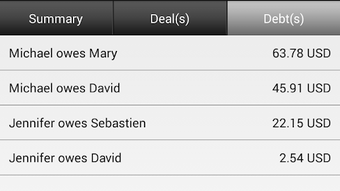
- Debt Minimization & Resolution – The app automatically calculates and suggests optimal payment flows to minimize the number of transactions needed to settle debts.
- Automated Report Generation – A summary report is compiled and sent via email to all participants, ensuring transparency and reducing follow-up communication.
- Currency List & Conversion Tools – Users can view a list of active currencies and manage conversions efficiently within the app.
- Help Section & FAQs – A built-in support system provides guidance on common usage scenarios and troubleshooting steps.
These features collectively support real-world scenarios such as splitting a restaurant bill during a cross-border trip, tracking shared accommodation costs, or managing group purchases abroad. By centralizing financial data and automating reconciliation, Square up reduces manual effort and enhances accuracy in shared spending.
User Interface, Workflow & Performance
The user interface of Square up is designed with simplicity and clarity in mind, focusing on intuitive navigation for managing shared expenses. Core actions such as adding an expense, assigning participants, and selecting currencies are accessible through a streamlined workflow. The app organizes data by events, allowing users to switch between different group activities with ease.
Navigation appears to be consistent across screens, with clear labels and visual cues to guide users through each step. The workflow emphasizes minimal input—users can quickly log payments, assign splits, and tag locations without excessive data entry. The developer did not specify resource usage details, so exact performance metrics such as CPU or RAM consumption remain unknown.
General software behavior patterns suggest the app operates efficiently on modern Android devices. Stability and responsiveness are expected to be adequate for typical usage, though real-world performance may vary based on device capabilities. The app’s lightweight size of 12.4 MB indicates it is optimized for low storage impact.
Compatibility & System Requirements
Square up is designed for the Android operating system and is compatible with devices running the specified version. The installation size is 12.4 MB, which is relatively small and suitable for devices with limited storage capacity.
Exact system requirements were not listed. The developer did not provide information on minimum RAM, processor specifications, or Android version compatibility. Platform compatibility information is limited to the Android platform, with no indication of support for iOS or other mobile ecosystems.
Users should ensure their device meets general Android standards for app installation and operation. For optimal performance, it is recommended to use a device with up-to-date system software and sufficient memory.
Pros and Cons
Pros
- Free to download and use with no credit card required
- Supports multi-currency expense tracking and conversion
- Intuitive interface designed for quick expense logging
- Automated debt minimization reduces transaction complexity
- Event-based organization improves data clarity
- Geolocation tagging enhances context for each expense
- Report generation and email sharing improve group transparency
Cons
- Only available on Android, with no iOS or desktop version
- No publicly available system requirements or hardware specifications
- Performance and resource usage details not disclosed
- Limited to mobile use; no desktop or web interface
- Language support is restricted to English, French, and Spanish
FAQ Section
Is Square up available for iOS devices?
As of the current release, Square up is only available for Android users. There is no official iOS version listed by the developer.
Is the app safe to use?
Square up does not require a credit card to sign up, and the developer has not disclosed data handling practices. Users should review the app’s privacy policy for detailed information on data security and storage.
How often are updates released?
The developer did not specify a release schedule for updates. Users are advised to check the app store for new versions and improvements.
What type of license does Square up use?
Square up is distributed as a free application with no subscription or in-app purchase model mentioned. It operates under a freemium model, though no premium features were described.
Can I use Square up offline?
While the app’s offline functionality was not explicitly confirmed, basic expense logging may be possible without internet access. However, features like report generation and currency conversion may require connectivity.
Final Thoughts
Square up delivers a focused and practical solution for managing shared expenses in multi-currency environments. Its clean interface, event-based organization, and automated debt resolution make it a valuable tool for travelers and group participants. The ability to generate and share reports enhances accountability and reduces friction in financial discussions.
While the app is limited to Android and lacks detailed technical documentation, its core functionality is well-suited for users seeking a reliable, free expense tracking solution. The absence of a desktop version and limited language support may restrict broader accessibility, but the app’s strengths in usability and automation outweigh these constraints for its target audience.
For anyone involved in group spending across borders, Square up offers a smart, efficient way to stay financially aligned. Download Square up now.







